I’ve Finally Replaced My Aging GPU!

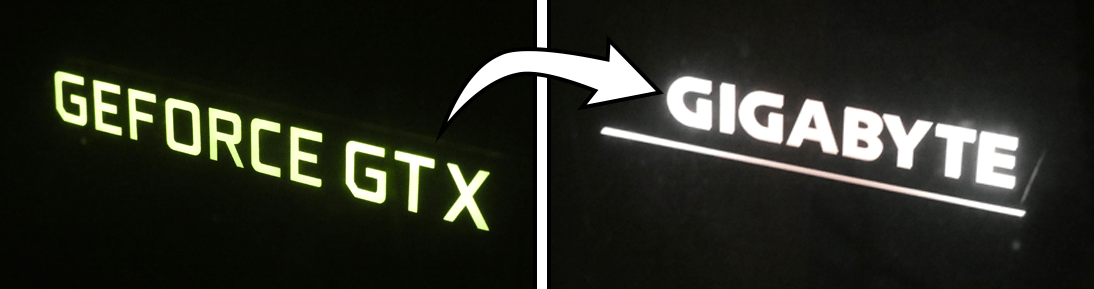
Before & after shots of my old GTX 1070 and the newer RTX 3060 Ti inside the PC

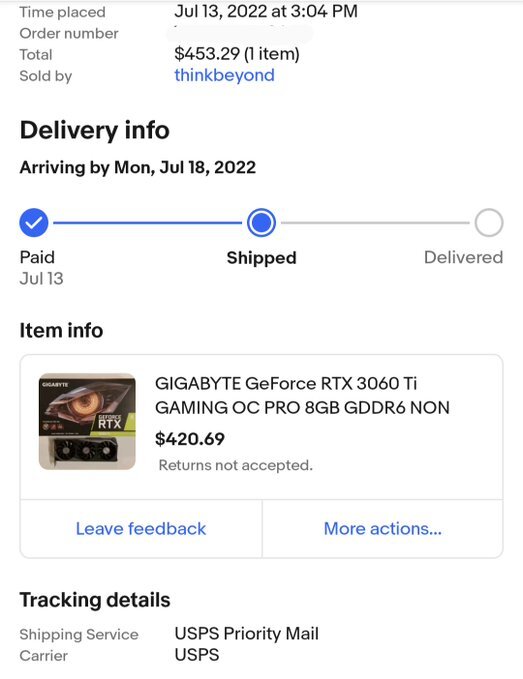
It’s been about two years since I purchased an Nvidia GeForce GTX 1070 Founders Edition GPU on eBay for a whopping $186.50 ($216.11 final costs w/ shipping & taxes). Nowadays, you can get this GPU for around $100 on an eBay auction if you’re lucky to get one. I bought the 3060 Ti instead of a 3070, or something similar because I don’t play many PC games regularly. Especially any games that are on the graphics-intensive side of the spectrum. For the cost of this new GPU, I managed to win an auction on eBay for $420.69 ($453.29 final costs). Which is about twice compared to what I paid for the GTX 1070.

Order details on the RTX 3060 Ti graphics card

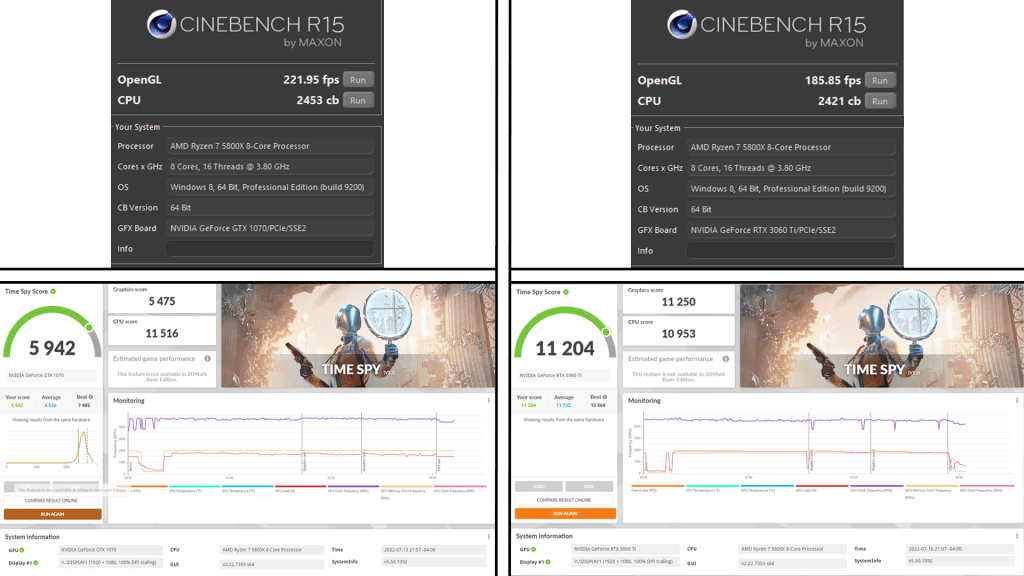
Comparing the difference between the two cards in terms of performance. You can see a massive difference for the Cinebench R15 and 3DMark benchmarks. Starting with Cinebench, the CPU render test scored 2453 cb and got 221.95 FPS for the OpenGL test on the 1070. For the 3060 Ti, I got a similar result with the CPU render and got a worse score of 185.85 FPS. The GPU’s utilization was around 40% throughout the test and went down to 10% after the test. For the 3DMark results, I got a Time Spy score of 5,942 with the 1070. 5,475 for the graphics averaging around 40 FPS and 11,516 for the CPU tests. Also, the score I got was deemed to be “below average” compared to other computers with the same hardware I have. With the 3060 Ti, it got a Time Spy score of 11,204. I averaged around 68 FPS for the GPU with a score of 11,250 and a CPU score of 10,953. This is a tad worse than what I got compared to the 1070. And finally, in Automation, I turned on ray tracing on both the low and high settings to see how it performs. With the 1070, the performance really degrades once it’s at the low ray tracing preset. Once I click on the high preset, it either runs at around 2-4 FPS or crashes the game. With the 3060 Ti, it runs at around 20-30 FPS on low ray tracing settings, and on high settings, it runs at around 10 FPS. It is manageable if I want to take high-quality screenshots of a car and the environment, rather than having a bleak background that looks like a PS3 game.

Benchmarking results of the two GPUs. (From left to right: Nvidia GTX 1070 Founders Edition, GIGABYTE RTX 3060 Ti)

So the difference is clear, this 3060 Ti is a massive upgrade to the 1070. It did 17.7% worse in the Cinebench test which I find strange and 61.4% better for 3DMark. It may have cost me more than the MSRP of this card, but I’m still happy about it. It goes well with this custom PC build as I don’t have an aging component in this computer. A 3060 Ti would do well on top of this AMD Ryzen 7 5800X CPU that I got running with this build. Anyways, the 3060 Ti works great, and it is a step up from the last card that I’ve had for the past two years.

One Year In, New Changes

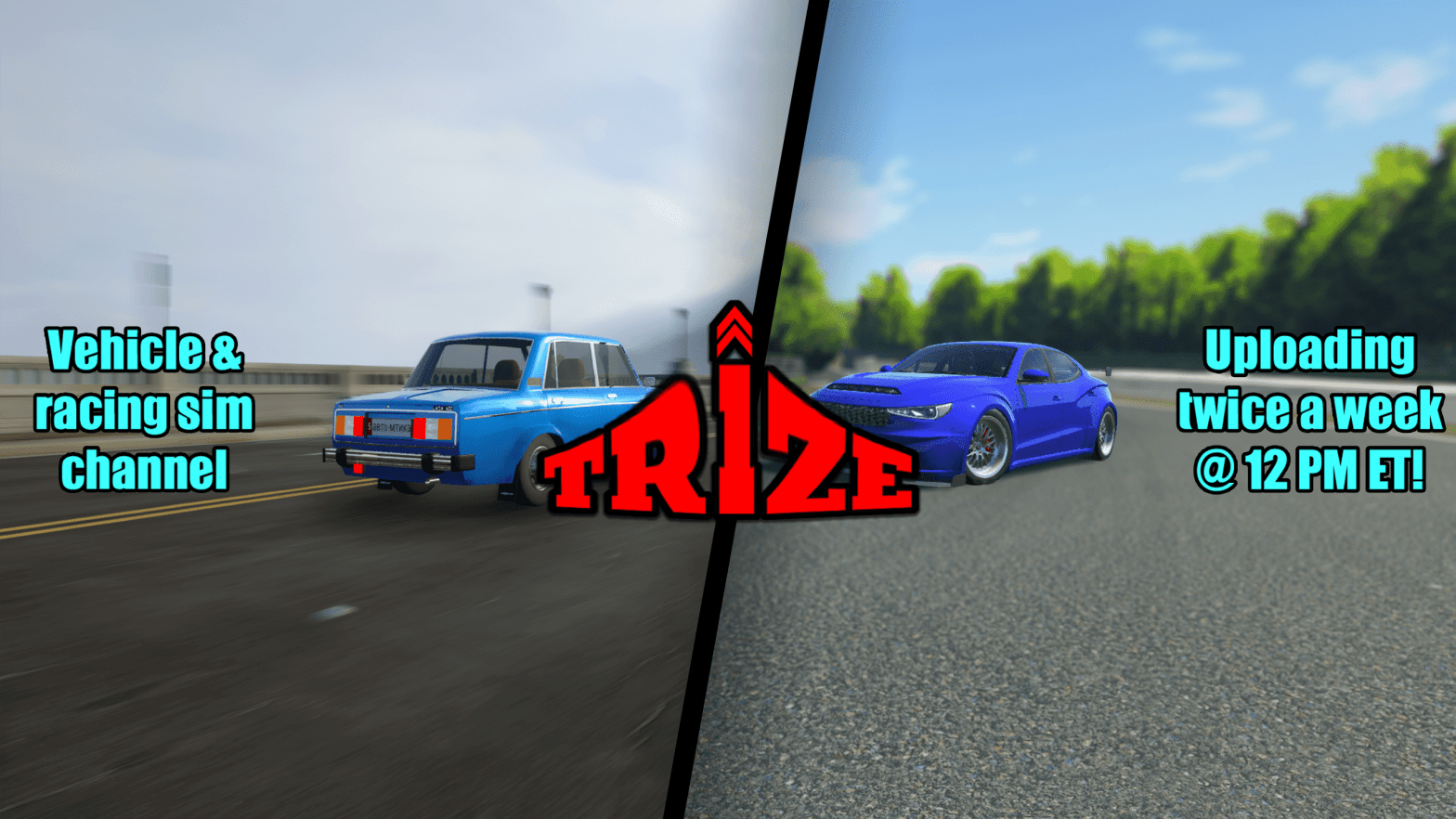
New YouTube channel art

It’s been exactly one year since creating the TRIZE YouTube channel in 2021. As of making this post, I’ve managed to gain; over 236K views, over 10.9K hours of watch time, and 1,710 subscribers. For a relatively small channel that had to restart from the beginning, these are some impressive numbers. Especially with this strong, continuing momentum from a month ago thanks to my no stress inline 3 engine video. Compared to my old channel, it took me over a decade to get to this point. That’s a significant difference between the TRIZE channel and the banned MrJacon000 channel.

On top of reaching its first anniversary, I decided to change the YouTube channel’s banner and trailer. As you can see the new banner, it contains two vehicles, the VAZ-2106 SR on the left, and the Bruckell Bastion on the right. It represents the two games I primarily play, both Automation and BeamNG.drive. Also, I made it more simpler and uniform compared to my last one where I had to change social media links for my Twitter and Facebook pages. And speaking of those links, I got rid of them in favor of the channel’s logo in the center, and a brief overview of the content I publish and schedule on the sides of the banner. Due to size limitations, you can’t see these on the YouTube mobile app, but you can see it on desktop.

For the new channel trailer, it’s similar to the one I made back in May 2021 where I highlight about the channel’s topics and games I cover. It shows brief snippets of the videos I’ve published that are featured in this trailer. Ranging from Automation, BeamNG, Gran Turismo 7, and Flatout 3. This trailer will also be featured on the home screen of this website and will immediately replace the old one.

And finally, I would like to thank you for your continuing support for this channel. Whether you came from the new, or the old one. Even with this explosive growth within the past month, it’s the best performance I’ve ever seen for either channel. Gaining over 470 subs and 82,000 views, these are some incredible stats for a one-month period. After running this channel for a year, I expect this to keep growing at an excellent pace all thanks to you. Even if I’m “doing numbers” like a viral Twitter post. Anyways, I thank you for your support and for helping me continue with this journey on YouTube!

1K Subs & Fully Monetized!

Reaching 1,000 subscribers & YPP acceptance notification

Well guys, it’s been a 9-month journey to get over 1,000 subscribers and become partnered through the YPP (YouTube Partner Program.) While I can’t thank you enough for reaching this big milestone in less than a year, it’s been an honor getting here to this point on my channel. In terms of advertising on my videos, expect a bit more ads than usual as I’m fully monetized on the platform. Even though I’ve seen ads for channels under 1K subs because of their advertisement policy change they did about a few months ago. Anyways, I thank everyone who’s been supporting me since day one!

Domain Fully Registered!

New URL after registered domain

Another step in building my brand and authenticity begins yet again with this website’s domain being registered. If you look at the URL address bar at the top of your browser, you can see that the .wordpress subdomain is finally gone! This isn’t my first rodeo registering a website’s domain as I’ve purchased a 1-year domain for my old website, mrjacon000.com. When I registered that site after hosting it with the Weebly subdomain back in 2015, that’s where my old channel ended up getting terminated two days later. I was extremely bummed out when they made that radical decision back in late April of 2021. To view my old website, you type in mrjacon000.weebly.com. If you omit the .weebly subdomain, it will redirect you to this website’s home screen. My old domain will expire on April 25th, 2022 which could get rid of the website’s redirect link. This will make it useless for users to get another way of accessing my new website. For the plan that I’ve signed up for, I purchased the ‘Personal’ plan which costs $48/year with a free domain for one year. It also comes with more customization options, website hosting, and more analytic features from Jetpack. Anyways, it’s great to have this website registered to stand out more from the crowd. It could help bring in slightly more visitors to this website because the domain’s fully registered, rather than having a .whatever at the end of a website’s URL.

PC Build Success

Computer BIOS screen after first boot up

Recently, I’ve managed to assemble every single part to get this computer up and running. It took me over a month to get this completed and surprisingly, I was WAY under budget. I’ve spent a total of $1,004.34 after taxes & shipping for everything. From the CPU to the DVD drive, it was a costly project. After assembling the computer, I powered it on and it successfully booted to the BIOS where it detects the Ryzen 5800X CPU and 32 GB of RAM. Along with many other components making it work and outputting a display on my TV where I tested it for the first time. After turning it on, I haven’t done anything with the BIOS settings since I didn’t have access to a keyboard or mouse after powering it on. Not only that, if you look at the photo above, you see that the RAM clock speed is at 2133 MHz instead of 3200 MHz. That’s because I need to turn on “XMP” to enable higher clock speeds to get the most out of my RAM.

Since this computer is almost ready to go, I’ll replace my current gaming rig with the new one by next week as I need to copy data from my semi-unreliable hard drive to the new one. That’s probably going to take me about a day to do this as there’s at least 1.8 TB of data to copy from the WD drive to the 4TB Toshiba X300 HDD. I also got to do the same thing for my SSDs as I can’t boot up Windows at all after cloning all of my data. It just blue screens repeatedly because it doesn’t recognize these new changes on my new computer. I formatted everything on the new OS drive and installed Windows 10. Now, I have to copy all of the old drive’s data to the new one without including Windows 7. Once that is done, all operations like gaming and video editing will be done on the new computer.

With a new processor that’s like 4x powerful than my Xeon W3690, I’m going to see significant changes with rendering my videos and loading a ton of cars in BeamNG.drive. I’ll post a benchmarking and comparison video to give you guys a look at how much of a difference my old computer performance compared to my new one. For those tests, I’ll run a few benchmarking programs like Cinebench R15 and 3DMark. Then, I’ll do a couple of video rendering tests to compare the difference between how much time it takes to render a 1080P 60FPS video on VEGAS Pro 17. Finally, I’ll get on BeamNG.drive to test the CPU by spawning in several cars and see how each computer behaves in those environments. Anyways, I’m excited to make the switch and that’ll happen within the next week!

The Journey to Building a PC

Empty Cougar MX330 mid tower case

As the years pass, computer components become outdated which are replaced by faster and more efficient ones that perform tasks better than their predecessors. That’s why I’m committing to building a full-fledged gaming/workstation PC from the ground up. I have already purchased two parts online on Newegg on October 5th, a $49.99 Cougar MX330 case and a $40.99 CPU cooler by Cooler Master. My second purchase I’ve made on October 11th is an MSI motherboard for $139.99 on Amazon. The budget for this build is going to be under $1,200 for every new or open box component, like the CPU, RAM, motherboard, HDD, SSD, and PSU. I’m going to keep my Nvidia GTX 1070 Founder’s Edition GPU that I’ve purchased exactly one year ago to this date. It’ll save me roughly $300 for a newer GPU like an RTX 2060S or a 3000 series. I’ll end up replacing that in the next year or so when I see that the GPU is bottlenecking my gaming performance.

For the components that I’m going to use for this build, the processor is going to be powered by an AMD Ryzen 7 5800X (8C/16T). It’s a step up from the 5600X (6C/12T) which has a similar clock speed to the 5800X. The reason why I went for an 8 core CPU is to ensure I’m getting excellent frames playing CPU intensive games like BeamNG.drive. Especially when it comes to having like a dozen cars driving or existing in a single session. Also, I’m starting to get tired of my video editing software, VEGAS Pro 17 lagging when playing back a video that I want to edit. Sometimes it plays back just as fine, sometimes it freezes, and I have to wait a while for it to load. I have a list of parts that I’ve planned out with the part name and price tag below. I expect to complete this build by the end of the year as this is a costly build for me (and pretty much for anyone.)

TypeNamePrice
CPUAMD Ryzen 7 5800X$339.99
CPU CoolerCooler Master Hyper 212 Black Edition$40.99
GPUNvidia GeForce GTX 1070 Founder’s EditionReusing
RAMG.Skill Ripjaws V Series 32GB 3200MHz CL16$112.99
MotherboardMSI B550-A PRO ATX AM4$139.99
SSDADATA Ultimate SU800 1TB$89.99
HDDToshiba X300 7200 RPM 4TB$85.00
PSUEVGA BQ 750W 80+ Bronze Certified$61.52
CaseCougar MX330 Mid Tower$49.99
DVD DriveAsus DRW-24B1ST$22.99
Parts list of my planned computer build (Parts are subject to change if I find any alternatives)

TOTAL COST (w/o tax & shipping): ~$943.45

If a component’s price is slashed out, this means I’ve purchased and installed it without any problems. Prices are subject to change.

Ending my Video Outros?

I have had this in mind for quite some time, and it seems like I’m making my decision. All videos starting on October 1st will not show the 20-second video outro which shows me driving an Automation built vehicle, the Inspira Impressive WRECK STEVE — a Subaru Impreza WRX STI knockoff. According to many of my video’s view duration and viewer retention graphs, it shows when I begin to say my outro line, “So that’ll do it,” that’s everyone’s cue to leave the video and carry on. Usually, my outro video segments last for about 45 seconds to 1 minute 10 seconds which in my opinion, is a bit too long. That includes me giving remarks about the video, a car I built, and the future for my channel. On top of that, I have the outro video playing, which further increases the video duration. That’s the reason why I’m going to retire the outro video for something more simple.

As I plan on getting rid of my video outro segment, I’m going to keep the ending’s card system template which shows two of my videos, the subscribe card, and my social media links at the bottom. For example, when I say my usual ending line, “And for those who are interested in this type of content.” That’s where you’ll see the image fade in with the video blurred out. With the outro song playing in the background, I’ll try to keep it as is with it fading in from the beginning and have it play out. Another option is to change the track position of the song so it’s more fitting to every ending in my videos. The last option is to remove it entirely and hear my voice without any distractions. I’ll have a decision when I make another video with the outro video segment left out.

Moving in for the First Time!

Moving website operations from Weebly to WordPress

After a few weeks of working to get this website up and running, it seems like I’ve done it! In the past, I’ve made a website for my old channel, MrJacon000 on Weebly in late 2015. Both websites have similarities in terms of web design, but with WordPress, there’s more freedom in customizing a website compared to Weebly. For the past year or so on Weebly, I’ve noticed the website looks poor when viewing it on a mobile device, like a smartphone or tablet. For example, let’s say you went to my old website and you’re greeted with my homepage that is misformatted and quite unreadable. When viewing it on a desktop, everything would look clear as it should. What’s unfortunate, I’m unable to import all of my previous blog posts from my old website and put them here is because I need a “Business” level subscription that costs $33/month to make that happen. Even though, I’m going to register this website’s domain when my domain and yearly subscription expires on Weebly. Going forth about my subscription, when I had the old channel, I registered my domain and purchased a one-year subscription to Weebly’s basic plan for $8/month on top of registration fees for an additional $20. Currently, I have to live with paying their subscription for the next 7 months until the domain is up for renewal. Once that window closes in, I will shut down the domain and hopefully downgrade to a free Weebly website, not a paid one.

For this new website, what you’re going to see is kind of similar to the old one. It’s got my channel’s latest video along with a randomly generated video, blog posts similar to this, and a detailed about me page which gives a history lesson about my time on YouTube. There will be improvements to this website over time as I learn more about the capabilities that WordPress has to offer. All that I can say about this website is that it’s a start. Just like the last one that I’ve made over 6 years ago.